At some point every remote environment stops behaving like our local machine.
The local setup is close enough for a while. We run dependencies with Docker Compose, maybe a local cluster, maybe shared staging services. Most bugs are easy to reproduce and easy to fix. Then one day something behaves differently only inside the cluster, and suddenly we’re debugging an environment instead of an application.
The default answer is usually logs.
We add a few statements, rebuild the image, push it, redeploy the pod, wait for the rollout, reproduce the issue, and try to guess what happened between two log lines. If the logs weren’t detailed enough, we repeat the process again.
On a local application that feedback loop takes seconds. In Kubernetes it easily turns into several minutes per attempt. After enough iterations, half day is spent into rebuilds and rollout waits.
Sometimes we don’t need more logs. We need to see the application while it’s running.
The JVM supports remote debugging through JDWP (Java Debug Wire Protocol). Once enabled, we can attach IntelliJ or VS Code directly to the JVM inside the pod and debug it almost as if it were local: breakpoints, variable inspection, expression evaluation, stack traces, step execution.
We can debug the real process, inside the real environment where the issue actually happens.
How JDWP works
JDWP ships with the JVM. Enabling it is just a startup flag:
-agentlib:jdwp=transport=dt_socket,server=y,suspend=n,address=*:5005
What this does:
transport=dt_socket→ use a TCP socketserver=y→ the JVM opens the debug portsuspend=n→ the application starts normally without waiting for the debuggeraddress=*:5005→ listen on port5005
Once the application starts, the JVM waits for a debugger connection.
When the IDE attaches, we can:
- pause execution with breakpoints
- inspect variables
- evaluate expressions
- step through the code path
- inspect stack frames in real time
It’s the same debugger we already use locally, except the application is running inside Kubernetes.
JDWP has no authentication and no encryption. If someone can reach that port, they effectively control the JVM process but we need to keep this out of production.
Keeping debug configuration out of production
The cleanest approach is keeping JDWP entirely outside the base deployment configuration.
Production manifests should not know debugging exists.
Kustomize overlays work well for this because let you inject the debug configuration only in specific environments.
Example structure:
k8s/
  base/
    deployment.yaml
    service.yaml
    kustomization.yaml

  overlays/
    dev/
      kustomization.yaml
      debug-patch.yaml

    stg/
      kustomization.yaml
      debug-patch.yaml

    prod/
      kustomization.yaml
The base deployment stays clean: no JVM debug settings.
The overlay adds the JDWP configuration only where needed.
overlays/dev/kustomization.yaml
apiVersion: kustomize.config.k8s.io/v1beta1
kind: Kustomization

resources:
  - ../../base

patches:
  - path: debug-patch.yaml
overlays/dev/debug-patch.yaml
apiVersion: apps/v1
kind: Deployment

metadata:
  name: debug-demo

spec:
  template:
    spec:
      containers:
        - name: app
          env:
            - name: JAVA_TOOL_OPTIONS
              value: "-agentlib:jdwp=transport=dt_socket,server=y,suspend=n,address=*:5005"

          ports:
            - containerPort: 5005
              name: debug
Deploying the development environment:
kubectl apply -k k8s/overlays/dev
Deploying production:
kubectl apply -k k8s/overlays/prod
Production inherits the base configuration only, which means the debug port never exists there.
Also: use JAVA_TOOL_OPTIONS, not JAVA_OPTS.
JAVA_TOOL_OPTIONS is understood directly by the JVM regardless of how the application starts, which makes it much more reliable across different containers and launch scripts.
The demo project
The companion project is on GitHub at github.com/valeriomc/remote-debug-kubernetes. It’s a Spring Boot order service with a pricing engine that has a deliberately simple bug, introduced just to have something concrete to step through with the debugger.
Requirements:
- minikube
- kubectl (v1.14+ for built-in kustomize support)
- Docker
- k9s (optional, but useful for the walkthrough below)
Clone and start everything:
git clone https://github.com/valeriomc/remote-debug-kubernetes
cd remote-debug-kubernetes

make all
make all starts a minikube profile named remote-debug, builds the image inside minikube’s Docker daemon (no registry push needed, imagePullPolicy: Never), and deploys the dev overlay. When it finishes, the pod is running and JDWP is listening on port 5005 inside the container.
You can verify the deployment with:
make k9s
# or: k9s --context remote-debug
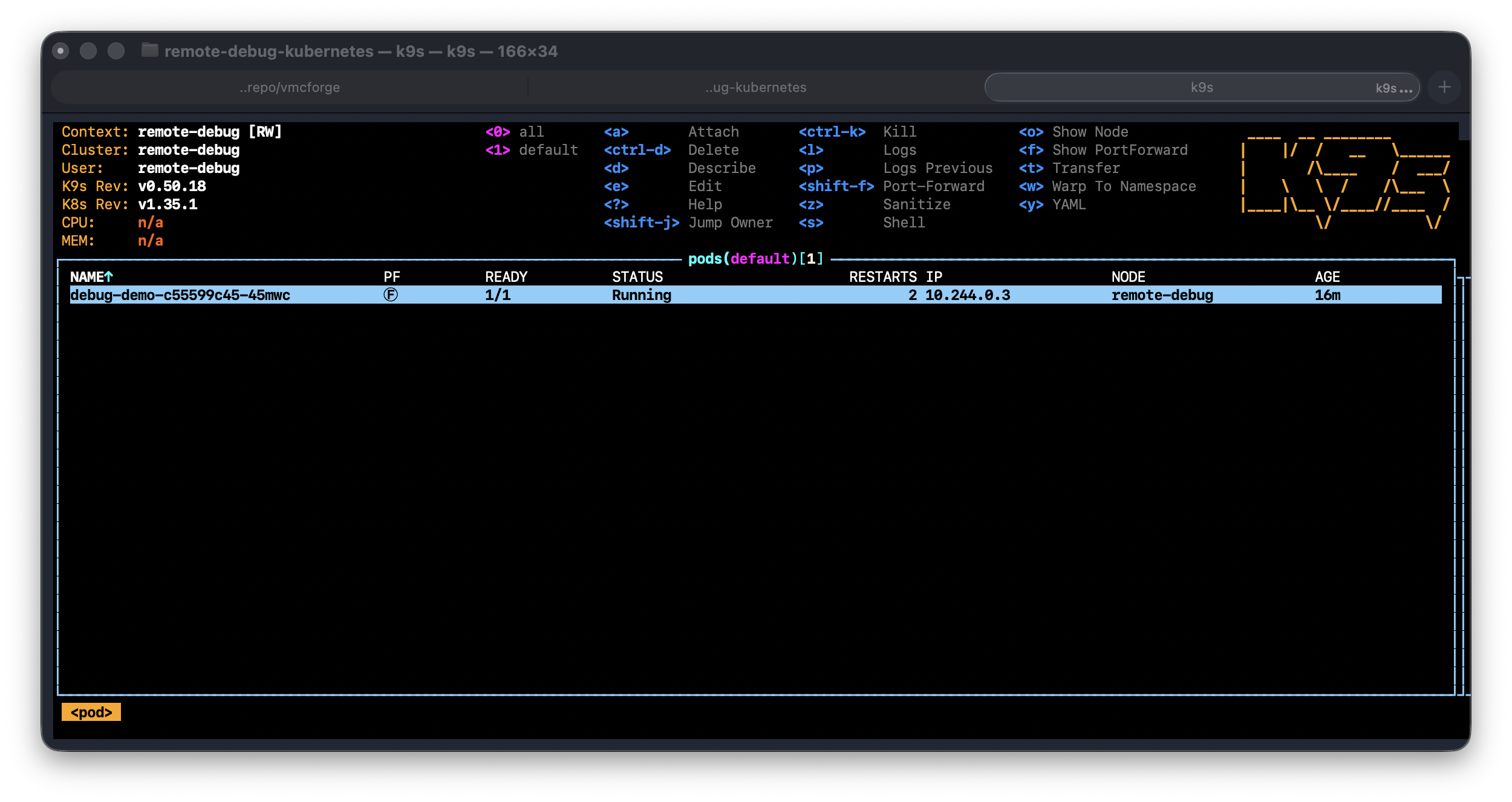
Opening the debug tunnel
The debug port exists inside the pod, so we need a tunnel from the local machine to Kubernetes.
kubectl port-forward handles that.
make debug
Under the hood:
kubectl --context=remote-debug port-forward deploy/debug-demo 5005:5005
Keep that terminal running of forward using equivalent command in k9s.
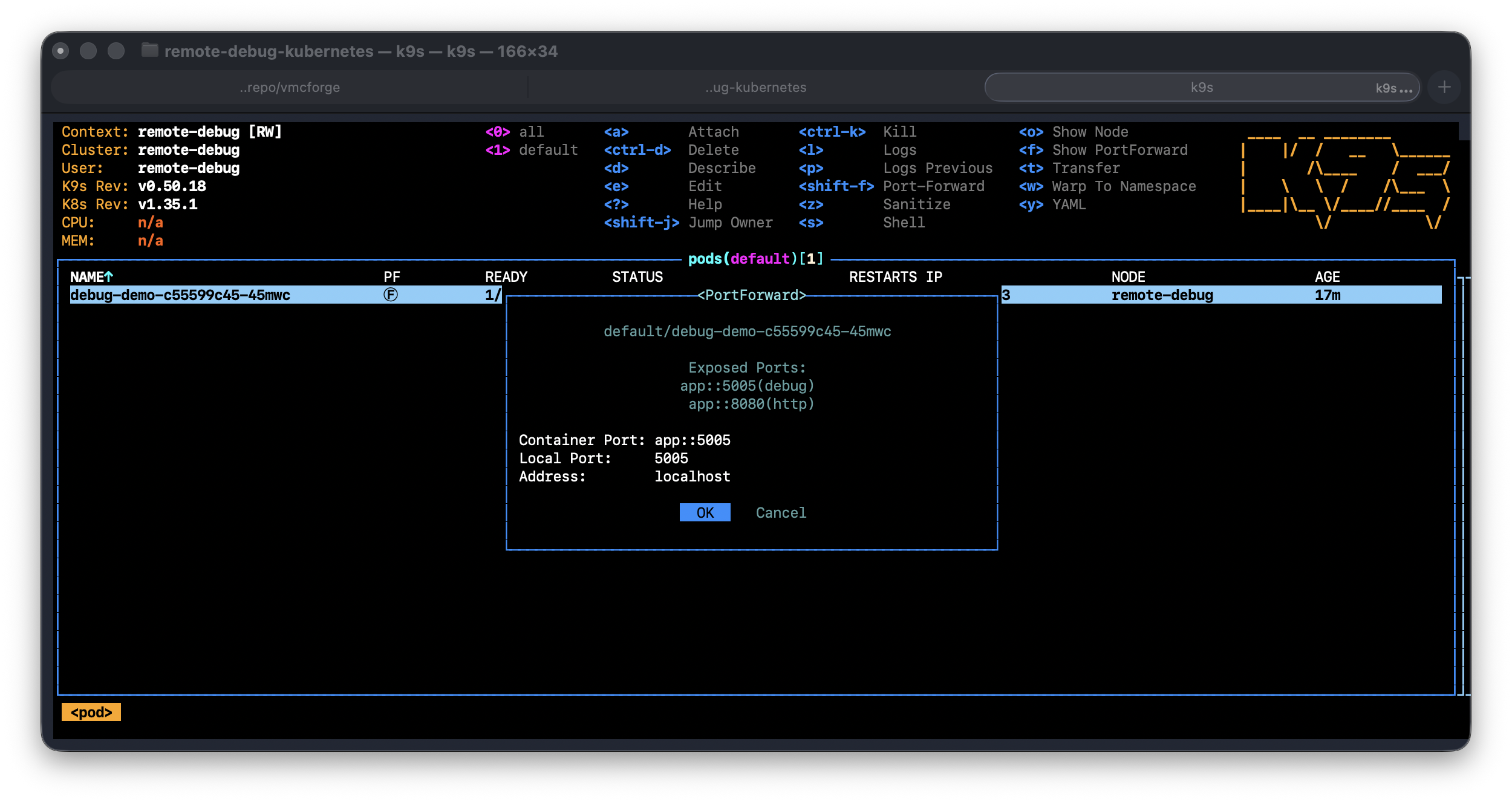
Now localhost:5005 on our machine points directly to the JVM running inside Kubernetes.
Just a temporary local tunnel between your IDE and the pod.
make debug kubectl port-forward deploy/debug-demo 5005:5005 leave running — tunnel stays open Connecting IntelliJ IDEA
Inside IntelliJ:
- Run → Edit Configurations → + → choose Remote JVM Debug
- Host:
localhost, Port:5005 - Debugger mode: Attach to remote JVM
- Use module classpath: select your project module
- Click OK, then hit the debug button
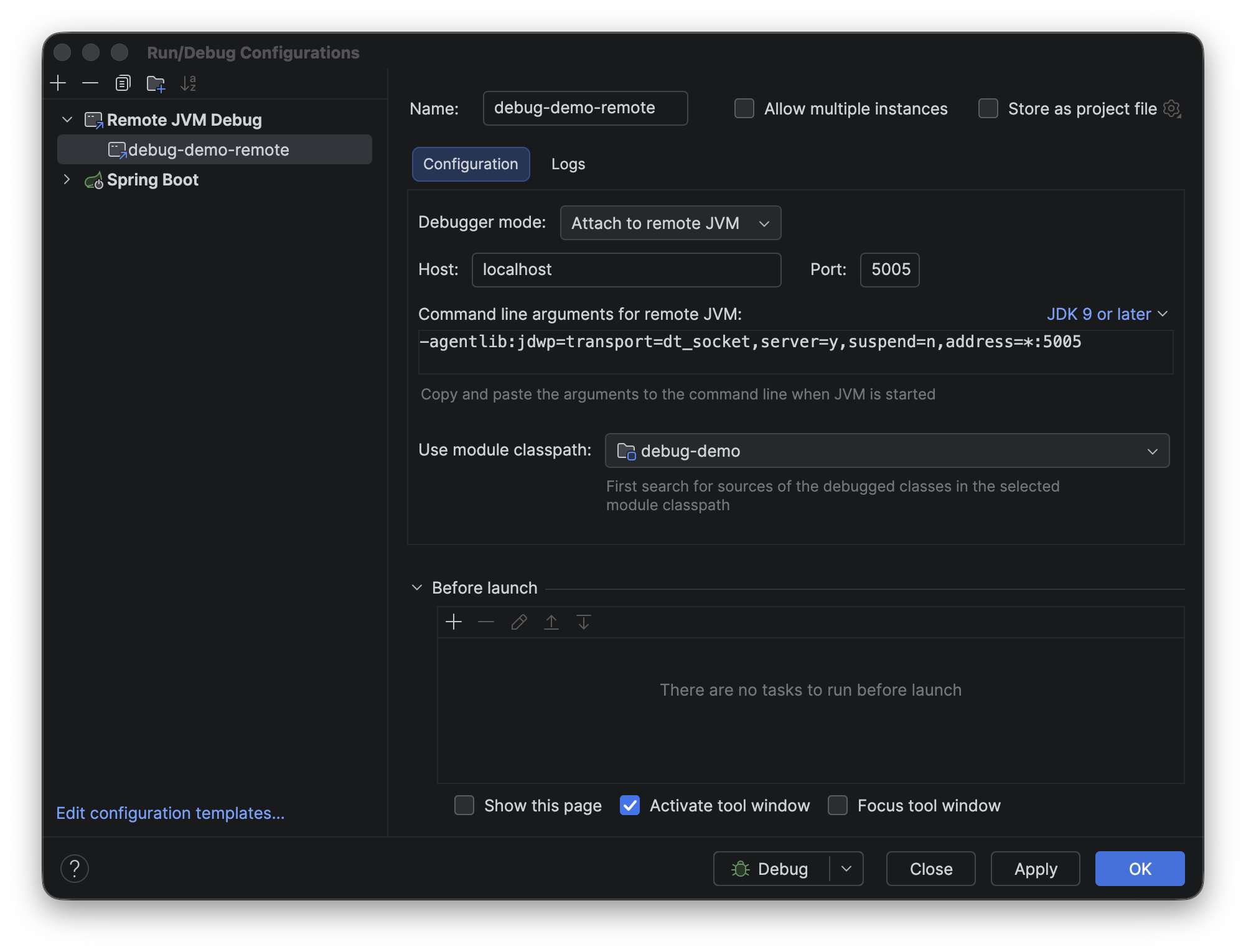
If everything is configured correctly we’ll see:
Connected to the target VM
At that point our breakpoints are live inside the Kubernetes pod.
Connecting VS Code
Add this to .vscode/launch.json:
{
  "type": "java",
  "name": "Attach to Kubernetes JVM",
  "request": "attach",
  "hostName": "localhost",
  "port": 5005
}
Run the configuration from the Debug panel and VS Code will attach through JDWP exactly the same way IntelliJ does.
Finding the bug
The pricing engine contains a boundary condition issue.
Gold-tier customers should receive a 10% discount for orders equal to or greater than $500.
The implementation looks like this:
if (subtotal.compareTo(GOLD_THRESHOLD) > 0) {
The problem is:
500.01works700.00works- exactly
500.00fails
Nothing crashes. The response still looks valid. Without debugging, this is easy to miss.
Set a breakpoint inside PricingEngine.goldDiscount() at the comparison line and send a request:
curl -X POST http://localhost:8080/orders \
  -H "Content-Type: application/json" \
  -d '{"customerId":"c1","tier":"gold","subtotal":500.00}'
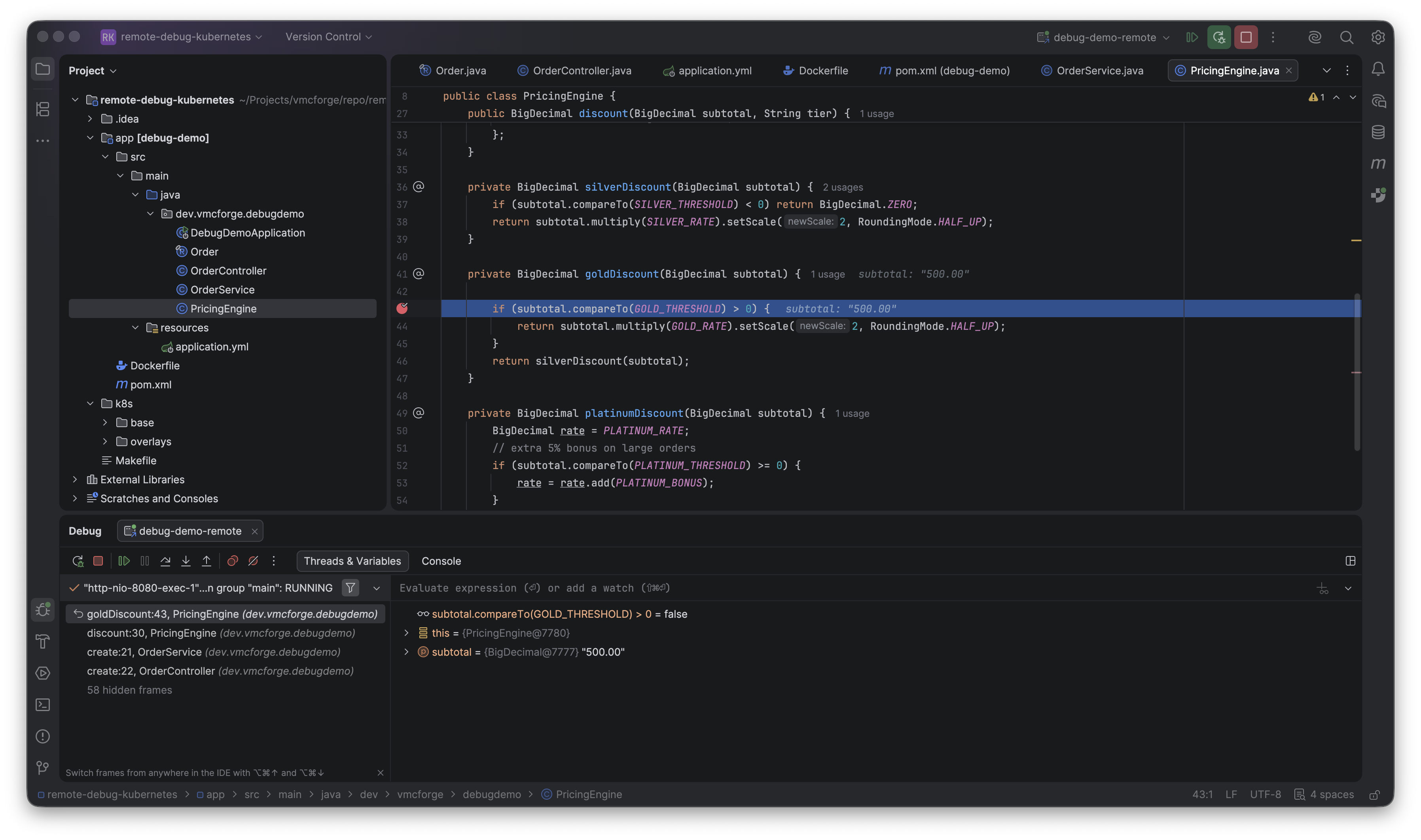
The breakpoint fires inside the running pod.
Now the problem becomes obvious immediately:
subtotal = 500.00GOLD_THRESHOLD = 500.00compareTo()returns0
The condition checks for > 0, so the branch never executes.
The fix is literally one character:
>= 0
Rebuild and redeploy:
make redeploy
The updated container rolls out and the issue disappears.
The Python equivalent: DAP
The demo project includes a second service written in Python that follows exactly the same pattern. Instead of JDWP, Python uses the Debug Adapter Protocol (DAP), specifically via debugpy. The idea is identical: expose a debug port in the dev overlay, forward it with kubectl port-forward, and attach from the IDE.
The Kubernetes side looks the same. The only difference is the env var and the port, since debugpy listens on 5678 by default and requires the process to wait for a client before starting if you want to catch early initialization.
Everything else, overlays, port-forward, IDE attach, live variable inspection, is the same workflow.
Conclusions
The pricing bug in the demo is intentionally simple, an off-by-one in a compareTo is the kind of thing we’d catch locally in a few minutes, and we could reproduce it just as easily without Kubernetes in the loop.
The example was created simply to have an application that makes remote debugging easy run and to test.
The real value shows up when the environment itself is part of the problem. A service that talks to an internal message broker we can’t run locally. A configuration that comes from a secrets manager, a ConfigMap, or a sidecar injection that doesn’t exist on our machine. Network policies and DNS resolution that behave differently inside the cluster. An issue that only surfaces under specific load patterns in staging, never in isolation.
In those cases there’s no local equivalent to attach to. We can’t reproduce the conditions from outside. The only path to understanding what’s happening is getting inside the environment where it’s actually happening.
That’s what JDWP gives us: a direct line into the running process, in the real environment, without rebuilding anything. The setup is small once it’s in the dev/stg overlay, it’s just there whenever we need it.